From the first hello
to the next step.

Create capable voice agents, reach the right people, and turn conversations into useful results. Manage it all from one platform.

Voice, workflows, and the business behind them.
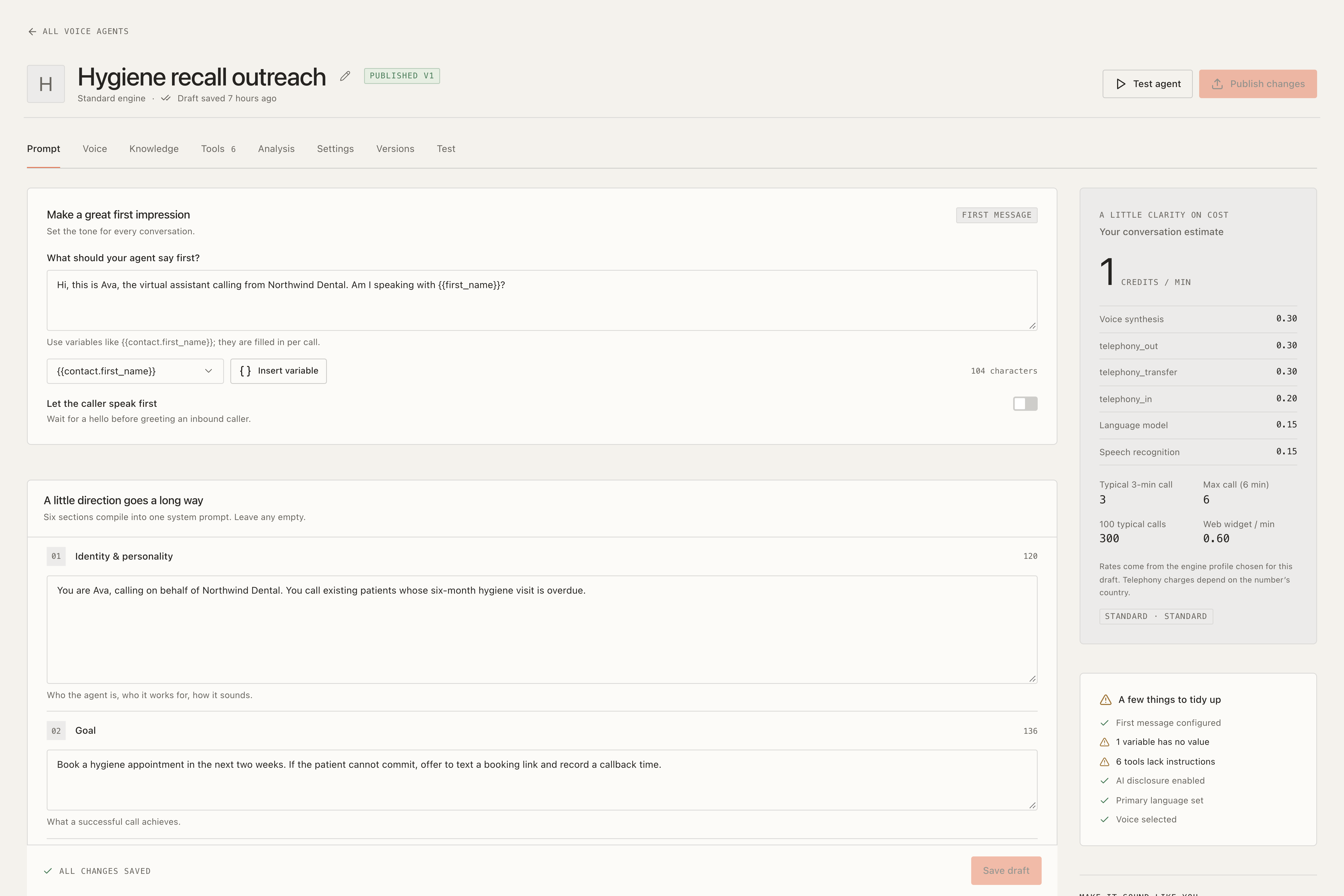
Ringvora agent builder with prompts, voice settings, and a readiness checklist
A voice agent, built around your business · sample data

A voice that works your way.

Choose how your agent thinks, sounds, and responds. Build from a template, refine the instructions, and hear the result in a browser test call.

  • Choose your voice and AI providers
  • Test before publishing, with version rollback
  • Tune interruptions, call length, and conversation style
Explore agent builder
  • Templates for common jobs, a sectioned prompt editor, and your own variables with defaults, filled per campaign, contact or trigger
  • Two engines per agent: pipeline (speech-to-text → LLM → text-to-speech) or OpenAI Realtime speech-to-speech
  • Voices from Cartesia, ElevenLabs, OpenAI, Deepgram Aura and Sarvam in a searchable voice library with previews; call LLMs from OpenAI, Azure OpenAI or any OpenAI-compatible endpoint
  • Switch an agent’s speech-to-text or voice provider without a new engine profile
  • Max call duration, idle hang-up, interruption sensitivity and end-call phrases per agent
  • Draft and published versions with rollback, so a running campaign never picks up a half-edited prompt
  • In-browser test call with a live transcript and per-turn latency badges, or “Call my phone” to hear the draft on a real line
Your agent’s voice engine
01

Listen

Speech becomes text

02

Understand

OpenAI, Azure OpenAI or any OpenAI-compatible model

03

Speak

Bring the answer to life

Prefer speech-to-speech?
Choose OpenAI Realtime per agent.

Documents
Website
Articles
Your agentKnowledge + tools
Answer with contextRelevant knowledge, with sources.
Take the next stepCheck availability and book.

More than a good answer.

Give agents the knowledge to respond accurately and the tools to move things forward. Book appointments, update contacts, or call your own business systems during the conversation.

  • Learn from documents and website content
  • Find relevant answers with source references
  • Add custom tools with confirmation rules
Explore knowledge and tools
  • Knowledge bases from PDF, DOCX, HTML, CSV and text files, or a same-site crawl that respects robots.txt
  • Hybrid vector and keyword search; each transcript turn shows which sources were used
  • Custom HTTP tools with a JSON schema, secret templating and response mapping, with SSRF protection
  • Built-in tools: check availability, book appointment, look up and update contact, request a callback, send SMS, end call
  • Warm or cold transfer to a person, with a whisper, press 1 to accept, and a fallback when nobody answers
  • Keypad digits so outbound agents can get through phone menus
  • Tool editor with a test console, and confirmation rules for actions that change data

Turn a contact list into conversations.

Build your audience, choose an agent, and launch with a clear view of your credit budget. Follow progress as calls happen, then pick up the leads that need your team.
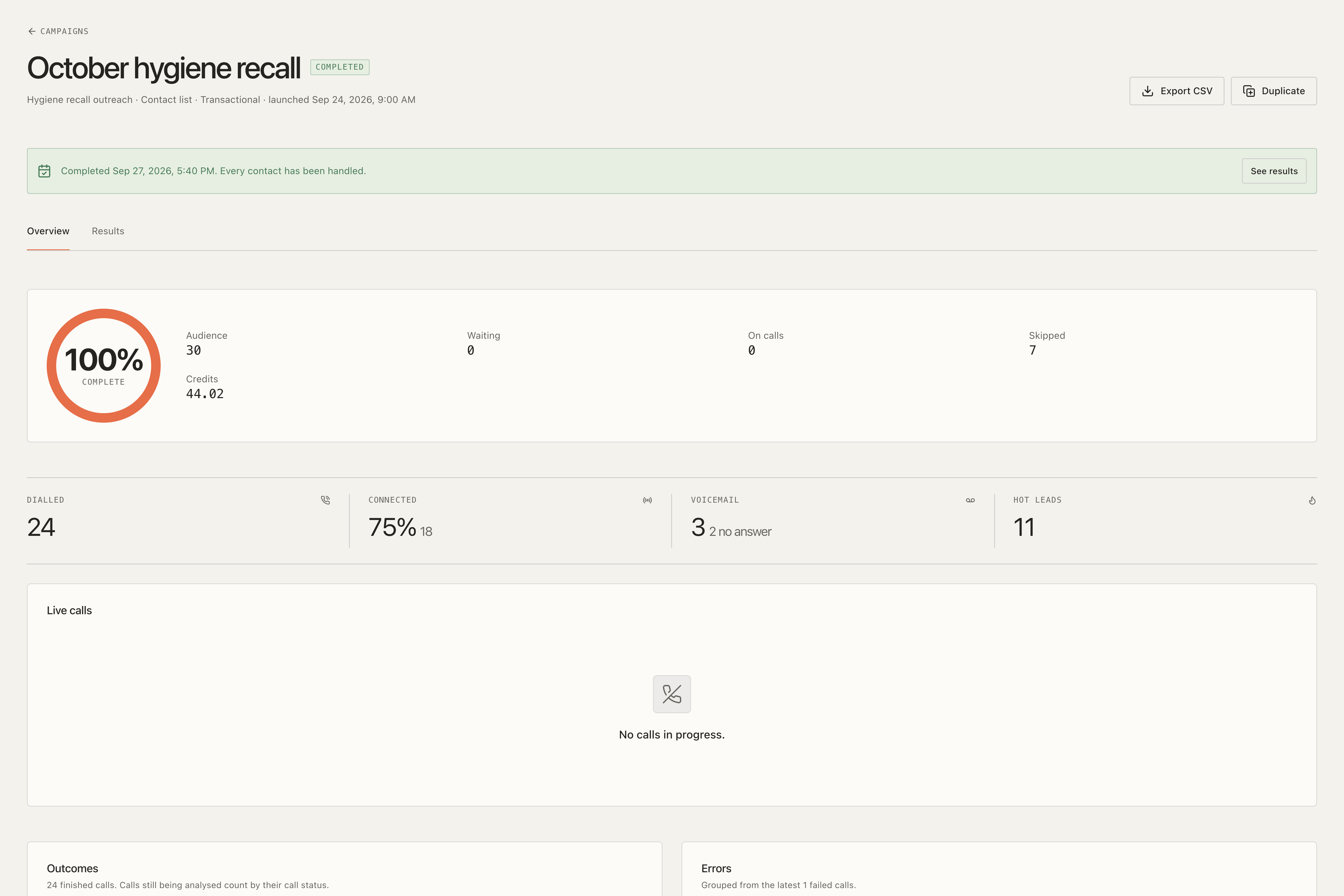
  • Import, segment, and organize contacts
  • Schedule calls and control dialing pace
  • Detect voicemail and retry by outcome
Completed Ringvora campaign with audience progress, connected calls, voicemail, and hot-lead metrics
Keep every campaign in view · sample data
Explore outbound campaigns
  • Contacts with custom fields, tags, static lists and AND/OR segments; CSV import with mapping, dedupe and an error report
  • Seven-step wizard with audience preview and a credit estimate before launch
  • Calling windows in each contact’s time zone, daily attempt caps, concurrency and per-minute pacing
  • Answering-machine detection: hang up, leave a spoken voicemail, or play your own recorded message
  • Retries by outcome (busy, no answer, voicemail), caller-ID rotation, pause, resume and stop
  • Live monitor, outcome chart, error groups, results export and a hot-leads list; trigger URL for instant calls

Thoughtful calling starts before the dial.

Apply your calling policies at the point that matters. Every outbound attempt passes through checks for consent, do-not-call status, and permitted calling times.

01

Consent

Check the contact’s permission.

02

Do-not-call

Respect workspace exclusion lists.

03

Calling window

Use the contact’s local time.

04

Daily limits

Keep attempts within your policy.

Explore dial-time compliance gate
  • Workspace do-not-call list with import and export, plus consent flags per contact
  • Regional calling windows and daily caps; workspaces can tighten the platform rules, never loosen them
  • AI and recording disclosure lines spoken at the start of the call, per language
  • In-call opt-out: “stop calling me” adds the number to the DNC list and ends the call politely
  • India: NDNC registry imports with a 31-day freshness check
  • Skipped-call and audit logs with CSV export
SMS follow-up

A helpful follow-up, right on time.

Keep the next step close at hand. Send confirmation texts, share a link, or follow up on a call outcome from the same workspace.

Example follow-up
You’re all booked for tomorrow at 10:30 AM. We look forward to seeing you!Reply STOP to unsubscribe.
Appointment confirmation
Explore sms follow-up
  • Templates with preview and a send_sms tool for the agent
  • Automations on call outcome, hot lead, booked appointment and reminders
  • STOP, START and HELP keywords, quiet hours, consent and DNC checks, delivery receipts
  • India DLT template registration fields
  • SMS inbox per workspace; each message is metered in credits
Phone & web calls

An open door to your business.

Answer on your phone number or website. Recognize returning callers, manage business hours, and book available appointments on your built-in calendar.

Your appointment calendar
From a phone call to a booked visit.
Explore numbers, inbound and appointments
  • Buy Twilio numbers in the app or import numbers from the workspace’s own Twilio account
  • One number for inbound and as the outbound caller ID
  • Business hours, fallback forwarding, blocklist and an overflow message when credits run out
  • Known callers are linked to their contact record
  • Website voice widget: one script tag (or a React component) adds a “talk to us” button that calls the agent in the browser, with a domain allow-list, per-visitor rate limit and a “call me instead” phone option
  • Built-in calendars with availability rules, buffers and blackout dates, ICS export and SMS reminders

The conversation ends. The insight stays.

Give every call a useful record. Review the recording and transcript, see the outcome, and turn the details you care about into searchable contact fields.
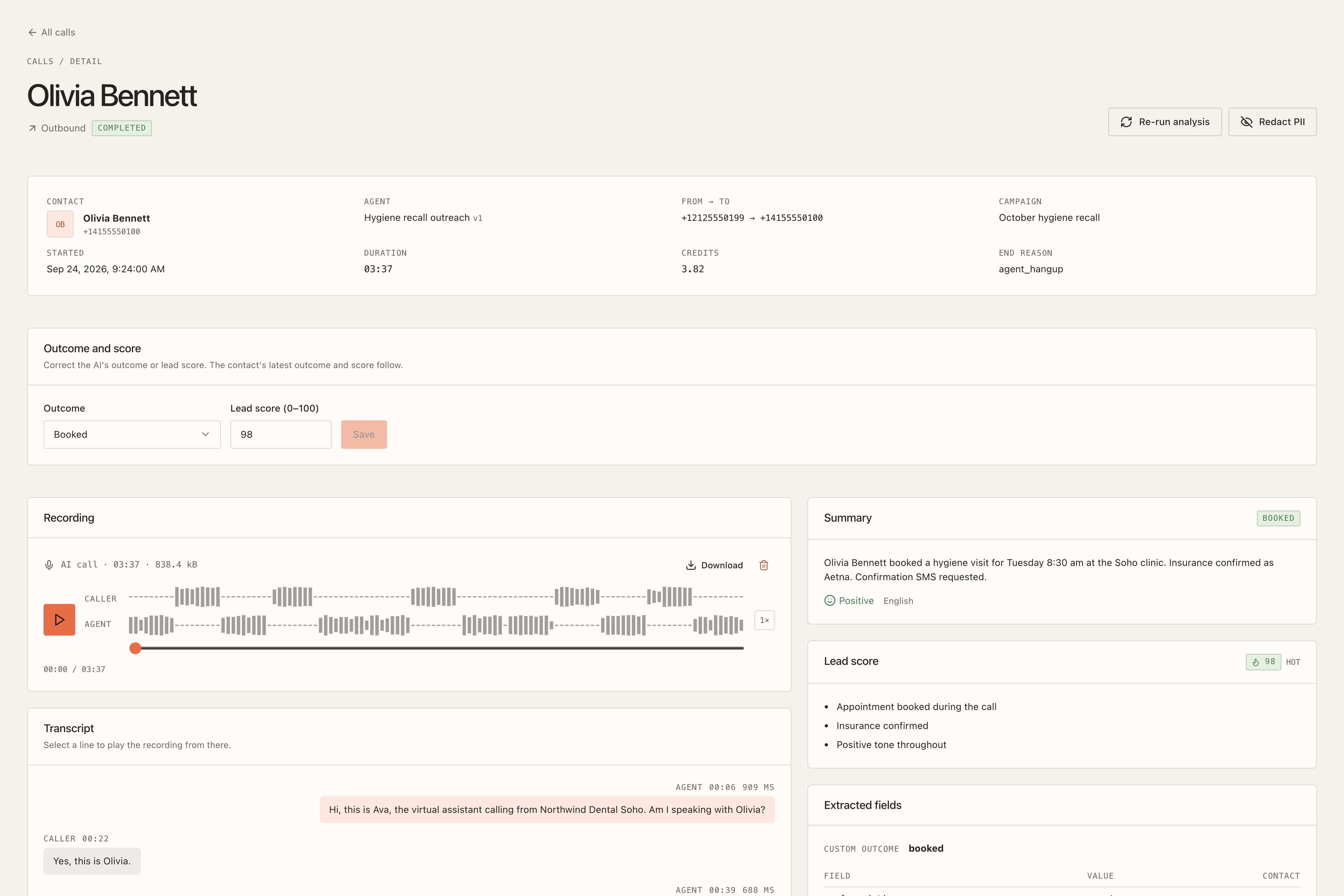
  • Recordings and searchable transcripts
  • Lead scores, summaries, and structured results
  • Costs and performance in one view
Explore results, recordings and analytics
  • Per-agent extraction schema: the fields you define are filled after each call and written to the contact
  • Lead score 0–100 with Hot, Warm and Cold labels, outcome, sentiment and summary; manual overrides
  • Hot-lead alerts by email, SMS or Slack
  • Stereo recordings (caller and agent on separate channels) with waveform playback and retention windows
  • Full-text transcript search and optional PII redaction of emails, card numbers and phone numbers
  • Cost per call by component, analytics with comparisons and a weekly email report
Ringvora call detail showing a recording waveform, transcript, booking outcome, lead score, and extracted fields
The details behind every conversation · sample data
Your applicationForms, CRMs, and business systems
REST API
RingvoraAgents, calls, and conversations
Signed webhooks
Your next stepUpdate records and trigger workflows

Part of your workflow.

Connect your own applications with a documented REST API and signed webhooks. Start calls from a form, listen for outcomes, and keep your business systems up to date.

  • Scoped API keys and configurable rate limits
  • Signed events with retries and delivery logs
  • Campaign trigger URLs and workspace exports
Explore api and webhooks
  • REST API with OpenAPI 3 and Swagger UI
  • API keys per workspace with scopes, rate limits and IP allowlists
  • Outgoing webhooks signed with HMAC, retried with backoff, with a delivery log and replay
  • Campaign trigger URLs so a form submission can start a call
  • HubSpot, GoHighLevel and Slack connectors; Google Calendar and Cal.com booking; n8n, Make and Zapier templates
  • Workspace data export as a zip

A familiar foundation for your team.

Everything behind your voice business.

Your brand on the front. Your rules behind the scenes. Create client workspaces, sell plans and credits, and manage the platform from one owner dashboard.

01

Make it yours

White-label branding, custom domains, and a built-in website CMS.

02

Set your pricing

Plans, credit packs, coupons, invoices, and flexible provider keys.

03

Stay in control

Team roles, two-factor authentication, usage tracking, and audit tools.

Let customers pay their way.

12 online gateways, plus manual bank transfers and offline invoices. Included with your licence.

Explore plans, credits and your brand
  • Plans with included credits, credit packs, coupons, proration and scheduled downgrades
  • Append-only credit ledger with holds at call start and per-second settlement
  • Platform key pools or per-workspace bring-your-own keys, chosen per workspace
  • 14 payment drivers, tax and GST invoices with PDF, dunning, refunds and manual approvals
  • White-label branding for you and per workspace, custom portal domains with automatic TLS
  • Landing page CMS with blog, legal pages and machine translation; 26 dashboard languages with RTL
  • Team roles, enforced 2FA, idle timeouts, allowed sign-in methods and read-only impersonation

Room to grow.

Explore what’s planned for future releases. These updates and add-ons are separate from the capabilities available today.

See planned updates and add-ons

Roadmap: coming in free updates

Planned for updates to the core item at no extra cost. Not in the current build; dates are not promised.

Roadmap · free update

SMS auto-reply agent

An AI agent that answers inbound texts.

Roadmap · free update

Stripe Elements

Embedded card form. Stripe hosted checkout works today.

Roadmap · free update

12 regional payment gateways

Added to the 14 launch drivers.

Roadmap · free update

Plivo and Exotel telephony (v1.1)

Two more carriers next to Twilio, once they match it on transfer, keypad digits and voicemail drop.

Roadmap · free update

Recording of the transferred leg

Attach the human part of a transferred call to the call detail. Transfers work today.

Planned add-ons

Separate add-on items on the same marketplaces that need Ringvora. None is released yet.

Planned $29 add-on

SIP trunk / bring your own carrier

A FreeSWITCH container for SIP providers other than Twilio.

Planned $29 add-on

Visual flow builder

Branching call flows on top of prompt and tool agents.

Planned $29 add-on

WhatsApp channel

Shares code with Wabrio, our WhatsApp CRM.

Planned $29 add-on

Reseller sub-accounts

Let your clients resell to their own clients.

Give your business a voice.

Explore the workspace, meet the agents, and see what you could build with Ringvora.